To set up voicemail on Galaxy S27 Ultra, open the Phone app, tap Keypad, then touch and hold 1. Follow the spoken prompts to create a PIN, record your name and save a greeting. The whole process takes about two minutes. If the call does not connect to a mailbox, dial your carrier’s voicemail number instead (see the table below).
Voicemail still catches the calls you miss, especially from clinics, delivery drivers and businesses that never text. This guide covers classic carrier voicemail, Visual Voicemail, Samsung’s Direct voicemail feature and the most common fixes. Exact menu names can vary slightly by carrier and One UI version.
What You Need Before You Start
Gather these four things first so setup goes smoothly:
- An active SIM or eSIM with mobile signal (voicemail setup is a call to your carrier).
- A voicemail-enabled plan (most postpaid and prepaid plans include it, but a few budget plans do not).
- A PIN you can remember, usually 4 to 7 digits.
- About two minutes in a quiet place, so your greeting sounds clear.
How to Set Up Voicemail on Galaxy S27 Ultra
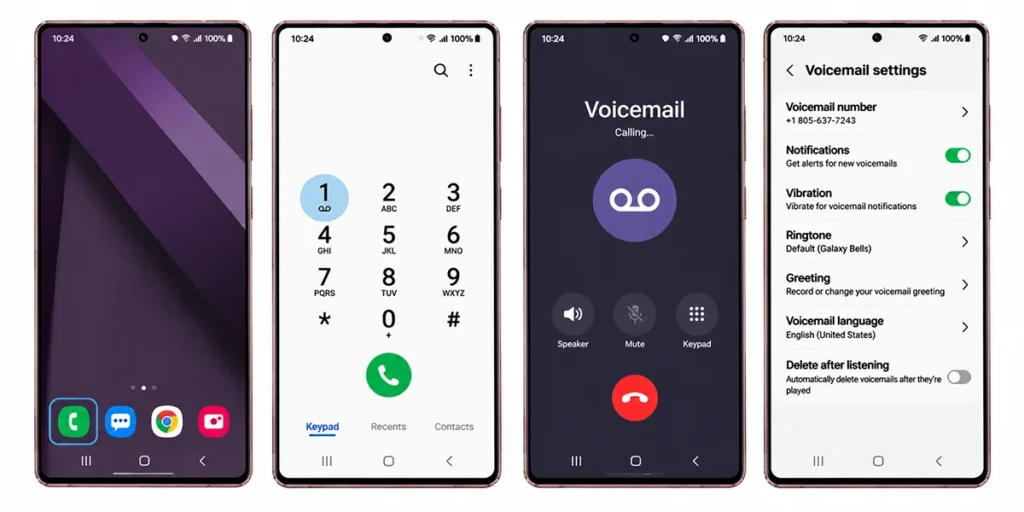
- Open the Phone app. Tap the green phone icon on your home screen.
- Tap Keypad. Skip this if the dial pad already shows.
- Touch and hold the 1 key. This speed-dials your carrier’s voicemail system.
- Follow the prompts. The system asks you to create a PIN, record your name and choose a greeting.
- Record your greeting. Speak clearly and keep it short, then confirm it.
- Hang up and test. Ask a friend to call you, let it ring out, then check that the message arrives.
If holding 1 does nothing, your carrier may use a different shortcut or number. That is common on prepaid plans and some regional networks.
Voicemail Numbers by Carrier
Use this table if holding 1 fails. Carriers change numbers occasionally, so confirm on your carrier’s support page.
| Carrier or region | How to reach voicemail | Notes |
|---|---|---|
| Most carriers | Hold 1 on the keypad | Default on most Samsung phones |
| Verizon (US) | Hold 1 or dial *86 | *86 works on some networks |
| AT&T and T-Mobile (US) | Hold 1 | Both also offer a Visual Voicemail app |
| EE (UK) | Call 07953 222222 | Per EE’s Galaxy device guide |
| Vodafone (UK) | Call 121 | Per Vodafone’s Galaxy device guide |
| Other carriers | Check your carrier’s support page | Number varies by country |
How to Set Up Visual Voicemail on Galaxy S27 Ultra
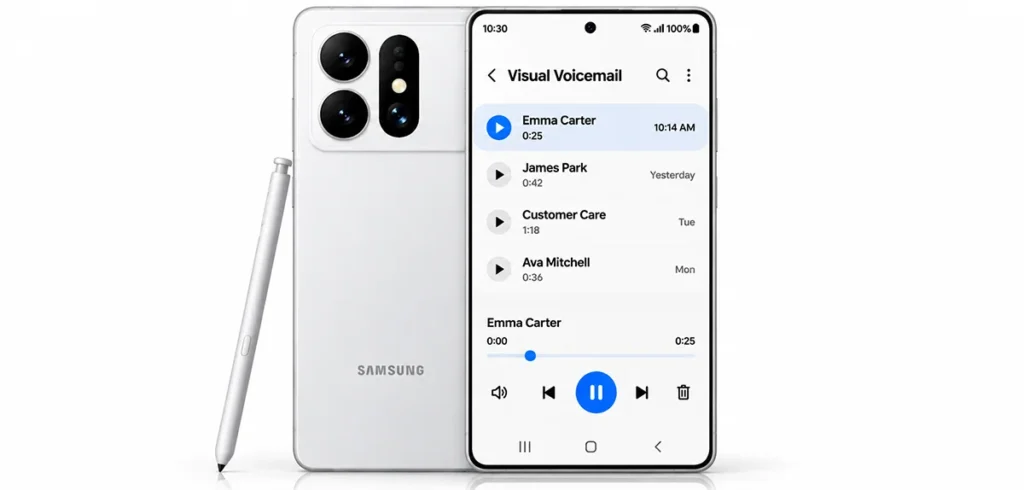
Visual Voicemail shows your messages as a list, so you can play, skip or delete them without calling in. Support depends on your carrier, and some networks.
- Open the Phone app and look for a Voicemail tab or icon. If you see one, tap it.
- If prompted, accept the terms and enter your voicemail PIN.
- If no tab appears, install your carrier’s Visual Voicemail app from the Play Store or Galaxy Store.
- Open the app and follow the activation steps.
Once active, new messages appear with the caller’s name, time and length, and many carriers add a text transcript.
Use Direct Voicemail on Galaxy S27 Ultra
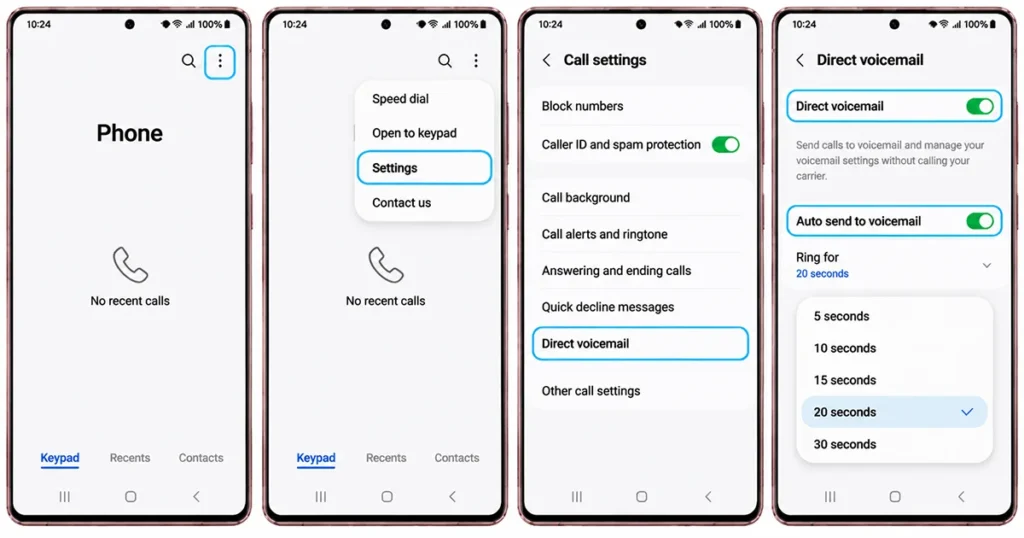
Samsung’s support page for the Galaxy S26 series describes Direct voicemail, which lets you send a ringing call to voicemail and read what the caller says as they record. If your S27 Ultra has it (availability depends on your region, carrier and software version), turn it on like this:
- Open the Phone app and tap the more options (three dots) icon.
- Tap Settings, then Direct voicemail.
- Switch it On and tap Agree on the terms.
- Turn on Auto send to voicemail and choose how long the phone rings first.
During a call, swipe up to More options and choose Direct voicemail to send that caller to your mailbox. Samsung notes the feature needs your phone on and connected to the mobile network, does not work on video calls and may fail if storage is nearly full. Transcriptions may also be inaccurate, and they can show on the lock screen.
How to Change Your Greeting, PIN and Notifications
Once setup is done, tweak it any time:
- Greeting: Hold 1, then follow the menu option to change your greeting. Most systems use a number such as 3 or 4, but the prompt tells you.
- PIN: The same voicemail menu has a password or PIN option. Pick something other than your birthday.
- Notifications: Go to Settings > Notifications > Phone and make sure alerts are on. Also check that battery optimization is not putting the Phone app to sleep.
- Save the number: Add your voicemail number to Contacts so you can call it in one tap.
Voicemail Not Working on Galaxy S27 Ultra? Quick Fixes
| Problem | Likely cause | Fix |
|---|---|---|
| Holding 1 does nothing | Voicemail number not saved | Dial your carrier’s number manually, then save it |
| Says “mailbox not set up” | Voicemail not activated on the line | Call your carrier to enable it |
| No new-message alerts | Notifications off or app restricted | Enable Phone notifications and remove battery limits |
| Messages not arriving | Poor signal or full mailbox | Check signal and delete old messages |
| No Visual Voicemail tab | Carrier does not support it | Install the carrier’s app or use classic voicemail |
| Forgot PIN | Mailbox locked | Ask your carrier to reset it |
If none of these help, restart the phone, make sure your SIM is seated correctly and update to the latest software. Then contact your carrier, since voicemail lives on their network and not on the phone itself.
Frequently Asked Questions
How do I set up voicemail on Galaxy S27 Ultra for the first time?
Open the Phone app, tap Keypad and hold 1. Follow the prompts to create a PIN, record your name and save a greeting.
What is the voicemail number for my Galaxy S27 Ultra?
The number depends on your carrier. Many use the 1 key shortcut, while others, such as Vodafone UK (121) and EE (07953 222222), use a dedicated number.
Does the Galaxy S27 Ultra have Visual Voicemail?
It can, if your carrier supports it. Check the Phone app for a Voicemail tab, or install your carrier’s Visual Voicemail app.
Why is my voicemail not working?
The usual causes are an inactive mailbox, a missing voicemail number, weak signal, a full mailbox or restricted notifications. Call your carrier to confirm the service is on.
Can I set up voicemail without a PIN?
Carriers differ, and some require one. A PIN is worth setting anyway, because it stops others from reading your messages.
Final Thoughts
Setting up voicemail on the Galaxy S27 Ultra comes down to one action: hold 1 in the Phone app and follow the prompts. Add a clear greeting, test it with a friend, and switch on Visual Voicemail or Direct voicemail if your carrier offers them. If something fails, your carrier’s voicemail number and support team are the fastest route.
Reference:
- Samsung – Direct voicemail on Galaxy.
- Google Phone Help – Check your voicemail: Google voicemail and Visual Voicemail guide.
2 thoughts on “How to Set Up Voicemail on Samsung Galaxy S27 Ultra: Step-by-Step”